Treasure Chest 3D Papercraft Box: A Creative Addition to Pirate-Themed Projects
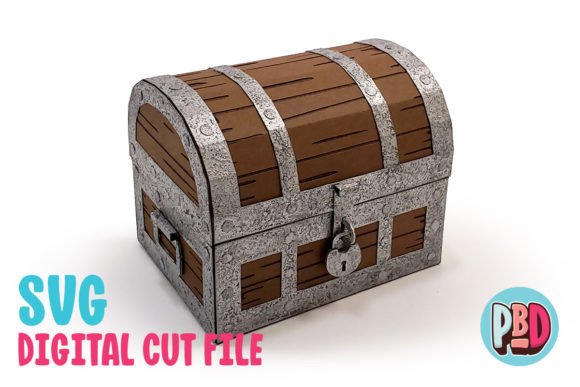
Bringing a touch of adventure and charm to any space, the Treasure Chest 3D Papercraft Box is a versatile and eye-catching design that appeals to both hobbyists and professionals alike. Whether you're setting up a pirate-themed bedroom, decorating for a themed party, or creating custom gifts, this papercraft box can serve as a stunning focal point. Its hinged lid allows for easy opening and closing, making it functional as well as decorative. The design also includes helpful texturing and painting tips to help users elevate their finished product beyond basic assembly.
What You Need to Know Before Getting Started
The Treasure Chest 3D Papercraft Box is designed with precision in mind, but even the best templates can lead to disappointing results if not used correctly. Here are some key points to consider before diving into your project:
- Material Choice Matters: This design is intended to be built using medium cardstock. Using thinner paper may result in structural weaknesses, while thicker materials could make folding and cutting more difficult or damage your tools.
- File Formats Are Specific: The download includes SVG and DXF cut files along with PDF instructions. While SVG files are compatible with Silhouette Designer Edition and Cricut Design Space, DXF files require careful setup in Silhouette Studio to ensure proper alignment and accuracy.
- Instructions Should Be Read Fully: Many users overlook the full material list included in the instructions. Missing just one item—like the right kind of glue or paint—can affect the final outcome.
Avoiding Common Pitfalls When Using Digital Files
One of the most common mistakes when working with digital papercraft files is not preparing the software properly. For example, DXF files may take longer to load in Silhouette Studio and might not render as cleanly as SVG files. If you're using DXF format, remember to adjust your preferences by following these steps: go to Edit > Preferences > Import DXF > Open, and change the setting from “As-is” to “Centered.” Failing to do so can cause misalignment and poor cutting accuracy.
Additionally, not all software platforms support these file types equally. Stick to recommended platforms like Silhouette Designer Edition or Cricut Design Space to avoid unnecessary troubleshooting. Always extract the ZIP file before attempting to use any of its contents, and double-check that all files have been successfully downloaded and opened.
Improving Your Results Through Proper Technique
To achieve the best results with your Treasure Chest 3D Papercraft Box, technique is just as important as the materials you choose. Let's explore a few areas where small adjustments can make a big difference.
Texturing and Painting Tips for Realistic Detail
Many users underestimate the impact of texture and color on the final look of the chest. The included texturing and painting tips are valuable resources for achieving a lifelike finish. For instance, using a sponge dauber to apply acrylic paints can mimic the aged, weathered look of a real treasure chest. Don’t forget to add highlights and shadows for depth—this simple step transforms a flat-colored model into something far more dynamic.
If you're aiming for a high-quality presentation, consider sealing the painted surface with a matte varnish. This not only protects the paint job but also enhances the overall durability of the box, especially if it will be displayed in a children’s room or at an event where it might be handled frequently.
Folding and Assembly Best Practices
Proper folding is essential for the structure to hold together securely. Use a bone folder or the back of a butter knife to score the fold lines lightly before bending them. This helps prevent tearing and ensures clean, crisp edges. Some users try to rush this part, which often leads to uneven folds and a weaker build.
Another overlooked detail is ensuring that the pieces are aligned correctly during assembly. Take time to match up tabs and slots precisely. A small adjustment now can save you from having to disassemble and rework parts later. It’s always a good idea to work in stages, securing each section before moving on to the next.
Choosing the Right Tools and Software
Selecting the correct tools and software is crucial for success with the Treasure Chest 3D Papercraft Box. While many assume that any cutting machine will work, compatibility issues can arise if the software doesn't support the required file formats. Make sure you’re using a version of Silhouette Studio that supports DXF imports, or better yet, opt for SVG files for smoother performance and cleaner cuts.
For those without access to a digital cutter, it's possible to print the template and cut manually—but this requires more time and patience. Manual cutting works well for smaller projects or if you prefer a hands-on approach. Just keep in mind that precise measurements and steady hands are necessary to maintain the integrity of the design.
Software Preference Settings Can Save Time
Setting up your software correctly is more than just a technical formality—it can significantly affect your workflow. If you're using the DXF file, adjusting the import settings in Silhouette Studio (as previously mentioned) ensures that the design loads properly and aligns to the center of your mat. Neglecting this step can lead to wasted time and potentially ruined materials if the design shifts during cutting.
Also, note that DXF files tend to open slowly compared to SVG files. If you're short on time or dealing with tight deadlines, such as for a party decoration, using the SVG file is the better choice. It offers faster loading times and sharper details, which can enhance the overall quality of your finished piece.
Real-World Applications and Creative Ideas
The Treasure Chest 3D Papercraft Box isn’t just a craft project—it's a conversation starter and a useful object. Here are a few ways people have successfully incorporated it into their lives:
- Pirate-Themed Bedrooms: Parents have used this box as a storage solution for toys or books, adding a whimsical element to their child's room. With a little creativity, it can double as a toy itself—filled with plastic coins or hidden notes.
- Party Decorations: Event planners and DIY enthusiasts often place this chest at the center of pirate-themed birthday parties. It serves as a prop for photos, a gift container, or even a puzzle box with a hidden surprise inside.
- Custom Gift Boxes: Bloggers and small business owners use the chest to package handmade items, such as jewelry or miniatures. Adding a personalized label or ribbon makes the gift feel extra special.
In all these scenarios, the key to satisfaction lies in attention to detail and thoughtful planning. Rushing through the process or skipping preparatory steps often leads to subpar results. By taking the time to understand the requirements and follow the provided guidance, you’ll end up with a piece that looks professional and feels rewarding to create.
When to Seek Help or Resources
If you find yourself struggling with the software setup or unsure about how to proceed with the assembly, don’t hesitate to refer to online tutorials or forums. Many creators share their experiences and solutions to common problems, and sometimes a quick search can resolve what seems like a major issue. Also, check if the platform you're using has updated drivers or plugins that might improve performance with DXF files.
It's worth noting that the PDF instructions are comprehensive, but they should be read carefully. Skimming over them can lead to missing critical information, such as recommended drying times for paint or specific folding sequences that affect the box’s stability.
Final Thoughts on Making the Most of Your Treasure Chest 3D Papercraft Box
Ultimately, the Treasure Chest 3D Papercraft Box is a fantastic resource for anyone looking to add a unique and thematic element to their creative projects. However, success depends on understanding the nuances of the materials, software, and assembly process. By avoiding common pitfalls—like using the wrong type of paper or neglecting software preferences—you can ensure a smooth and satisfying experience from start to finish.
Before beginning, take a moment to review the full set of instructions, verify your tools and materials, and confirm that your software is configured correctly. These small steps can prevent larger headaches down the line and help you achieve a beautiful, durable treasure chest that truly stands out. With the right approach, this papercraft box becomes more than just a project—it becomes a cherished part of your space or event.